Posts

Delete Multiple Rows from Gridview

The code below is to delete multiple rows form gridview at once. In this example DataTable is used to bind GridView. ----------------------------------------------------------------------------------------------------------------------------------- ASPX Page Code ----------------------------------------------------------------------------------------------------------------------------------- <%@ Page Language="C#" AutoEventWireup="true"  CodeFile="Default.aspx.cs" Inherits="_Default" %> <!DOCTYPE html PUBLIC "-//W3C//DTD XHTML 1.0 Transitional//EN" "http://www.w3.org/TR/xhtml1/DTD/xhtml1-transitional.dtd"> <html xmlns="http://www.w3.org/1999/xhtml"> <head runat="server">     <title></title>     <style type="text/css">         .style1         {             width: 50%;         } ...
Javascript MD5 Encryption

JavaScript MD5 Encryption Before using the code first download md5.js file from the link below https://docs.google.com/viewer?a=v&pid=explorer&chrome=true&srcid=0B2iokvd3EpXAZTcyY2UwYzAtNjcxNS00MzY1LWE2NDQtNDMxODMxYjE1ZGM0&hl=en_US Extract the folder and you will find the md5.js script file in script folder And below is the code to use the script file. Enter value in textbox to encrypt ant click the below button . <!DOCTYPE html PUBLIC "-//W3C//DTD XHTML 1.0 Transitional//EN" "http://www.w3.org/TR/xhtml1/DTD/xhtml1-transitional.dtd"> <html xmlns="http://www.w3.org/1999/xhtml"> <head>     <title>MD5 Test</title>      <script type="text/javascript" language="javascript" src="script/md5.js"></script> </head> <body>     <div>         Enter value in textbox and press Tab or click anywhere in the page<br /><br ...

Get Query String Values With Javascript

Image
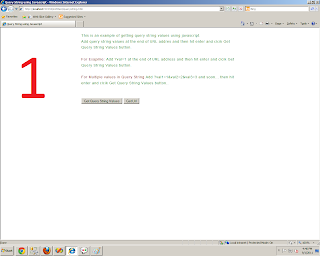
JavaScript Code To  Retrieve Query String Values This topic shows you how you can retrieve the query string values from a URL using JavaScript. The code is simple and understandable. Below is the complete code. <!DOCTYPE html PUBLIC "-//W3C//DTD XHTML 1.0 Transitional//EN" "http://www.w3.org/TR/xhtml1/DTD/xhtml1-transitional.dtd"> <html xmlns="http://www.w3.org/1999/xhtml" > <head runat="server"> <title>Query String using Javascript</title> <script type="text/javascript" language="javascript">     function getquerystring()     {         var qsarr = new Array();                  var qs = location.search.substring(1);         var singleqs = new Array();         var str ="";         qsarr = qs.split('&');    ...

Rounded Corner and Shadow Effect no Images

Image
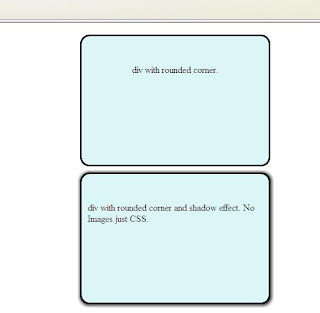
Before CSS3 to achieve rounded corner effect small images are used. But CSS3 introduce a new effect to achieve this effect without images and also a shadow effect. Below is the code. The below code is working for all browsers except IE. To run this in  IE the page should need to be hosted on server or using XAMPP or any other web server on local computer. Also have to include file ie-css3.htc for IE only. <!DOCTYPE html PUBLIC "-//W3C//DTD XHTML 1.0 Transitional//EN" "http://www.w3.org/TR/xhtml1/DTD/xhtml1-transitional.dtd"> <html xmlns="http://www.w3.org/1999/xhtml"> <head> <meta http-equiv="Content-Type" content="text/html; charset=iso-8859-1" /> <title>Untitled Document</title> <style type="text/css"> #roundedcorner {     width:300px;     height:200px;     margin:0 auto;     margin-top:20px;         border: solid 3px;     -moz-border...

Custom Fonts

Image
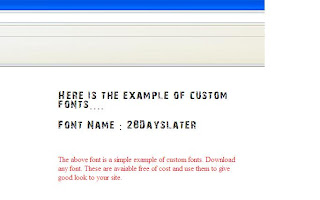
 A new feature of CSS3 is custom fonts. You have seen that some of the sites have very stylish fonts in headings. This feature is imperviously achieved by Photoshop  by creating an image of it or by using some font files. In case of using font files there is one problem and that is if you are using font files the you have to give an external link to user to first download and install the font to his computer.  But now CSS3 introduce a new feature to embed fonts to your site. Below is the simple code showing an example of it. If the font file is not available in the clients computer then it is automatically downloaded to the clients computer. <!DOCTYPE html PUBLIC "-//W3C//DTD XHTML 1.0 Transitional//EN" "http://www.w3.org/TR/xhtml1/DTD/xhtml1-transitional.dtd"> <html xmlns="http://www.w3.org/1999/xhtml"> <head> <meta http-equiv="Content-Type" content="text/html; charset=iso-8859-1" /> <title>Custom F...

Java Script Floating Verticle Sidemenu like JQuery

Image
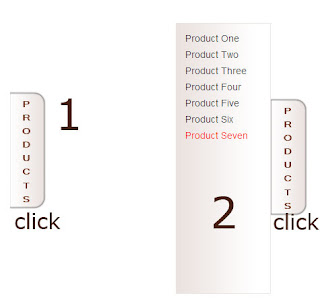
Now a days you have seen a floating menu, or a box in the right or left corner of many websites for feedback, contacts or for any other purpose. That is nothing but a jquery and jquery is advanced type of javascript. So here bellow is the code in Javascript is simple and easy. Copy the code and paste, a couple of images are also used. You can change the width and height according to your requirements. <!DOCTYPE html PUBLIC "-//W3C//DTD XHTML 1.0 Transitional//EN" "http://www.w3.org/TR/xhtml1/DTD/xhtml1-transitional.dtd"> <html xmlns="http://www.w3.org/1999/xhtml"> <head> <meta http-equiv="Content-Type" content="text/html; charset=iso-8859-1" /> <title>Slide Menu</title> <style type="text/css"> * {     margin:0px;     padding:0px; } body {     font-family:Arial, Helvetica, sans-serif;     font-size:12px; } #sidemenu {     top:100px;     width:60px; ...

Dynamic Title and Meta Data on Content Page having Master Page attached.

This is the most simple way to assign Title and Meta data on content page having Master Page attached. First add a Master Page in your .net website. The removes the title tag from the master page. Then add new page to your website and attach the master page with removed title tags. Now in the Page Load event of content page add the following line. Below is the simple code. protected void Page_Load(object sender, EventArgs e)     {         if (!IsPostBack)         {             HtmlTitle title = new HtmlTitle();             title.Text = "Dynamic Page";             Header.Controls.Add(title);             HtmlMeta tag = new HtmlMeta();             tag.Name = "keywords";             tag.Content = "key1, key2, key3, key4";       ...